Evolution of a Sketch
So the prompt for Genuary 30 is "genetic evolution and mutation." I implemented some evolutionary mutation for a day in last year's Genuary so this time I've chosen to creatively misinterpret the prompt. This time, I'm evolving the sketch code itself. I have some old Macs lying around and I thought maybe I'd start on the oldest Processing I can run, make a sketch, and then evolve it forward in time through newer versions (slightly cheating the evolutionary chain by jumping to p5.js eventually.)
Proce55ing alpha, Mac OS 9
A while ago, Raphaël de Courville dug up some old Processing builds from a server. One of which, an alpha build from 2002, was old enough that I could run it on Mac OS 9! This build is also old enough that it's still called Proce55ing.
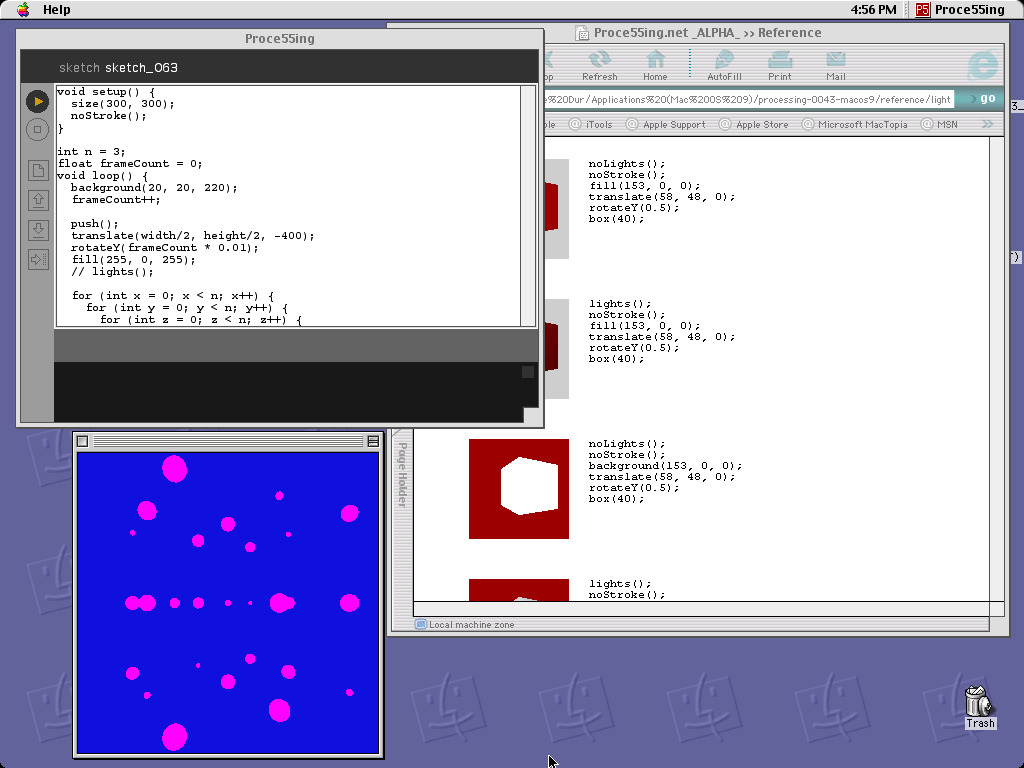
Proce55ing Alpha in Mac OS 9. The reference opens in IE 5.
I wanted to do something loosely inspired by my Genuary 12 sketch this year with a grid of animated boxes mixed with p5.strands shader test with some tasteful blur. The Proce55ing alpha can do some 3D, but slowly. Pretty sure this is doing software rasterization. So I'm definitely going to be skipping out on the shader, and instead just recreating the vibe loosely.

A grid of cubes for Genuary 12. This one used shader instancing.
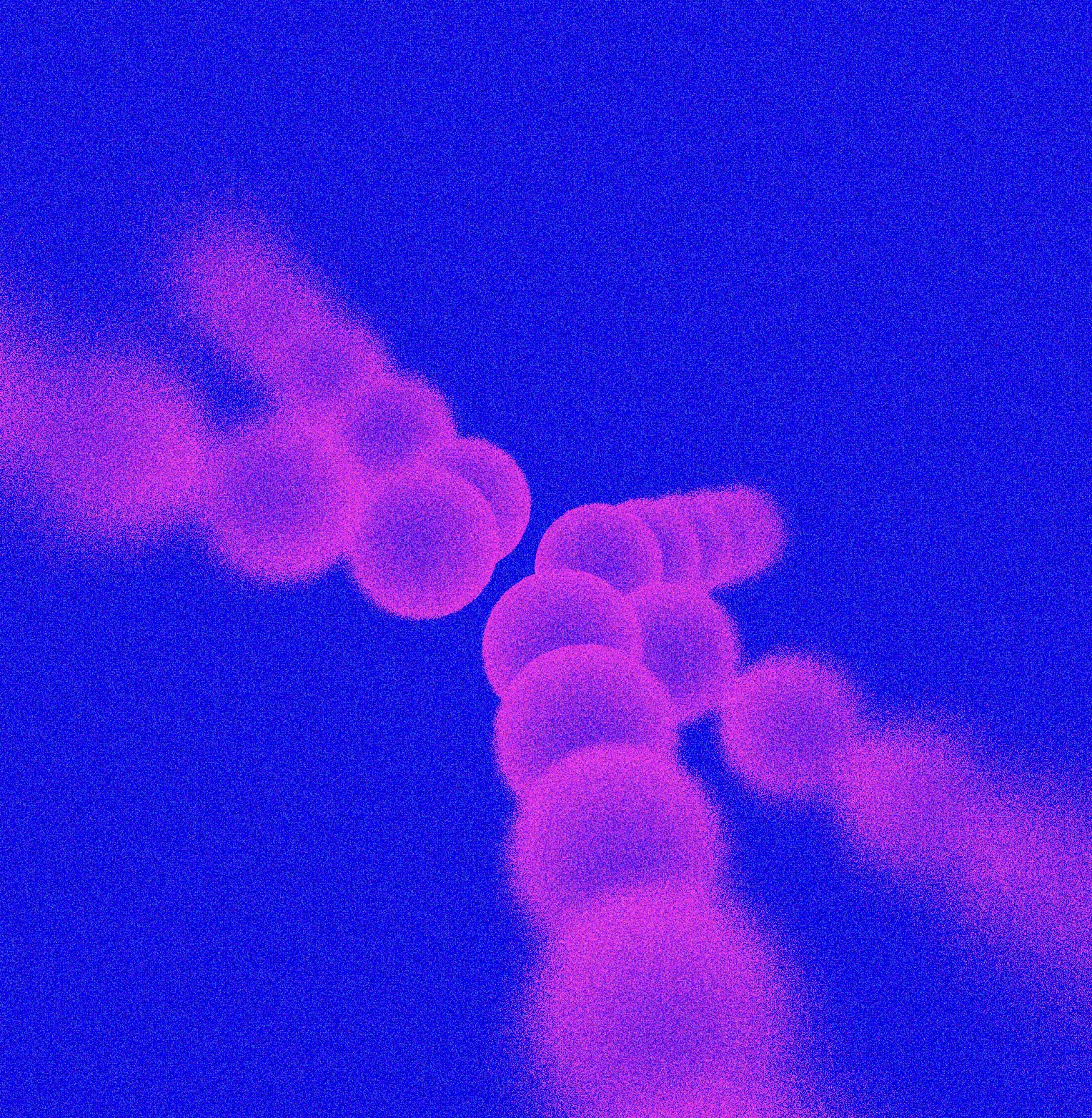
Some faux barrel blur done on one of our weekly p5.strands calls in the p5.js Discord.
The only lighting control you have is the lights() function. It also appears to be slightly buggy when translations are applied. So I opted to not use any lighting, and just make unshaded magenta spheres. I couldn't actually fit that many spheres in a grid without the frame rate tanking either, so we've got a very sparse grid. Probably if I were to optimize this more, I'd try to just use circles always facing the camera rather than spheres.
The code should look pretty familiar to anyone using Processing or p5.js today. Notably different from p5.js, the origin in 3D mode is the top left instead of the center of the canvas. Also, you use loop instead of draw as the main function if you want it to animate. Also, helpers like map or lerp haven't been added yet, so I've opted to implement a quick and dirty lerp. You have to keep track of frameCount yourself.
void setup() {
  size(300, 300);
  noStroke();
}

int n = 3;
float frameCount = 0;
void loop() {
  background(20, 20, 220);
  frameCount++;

  push();
  translate(width/2, height/2, -400);
  rotateY(frameCount * 0.01);
  fill(255, 0, 255);
  // lights();

  for (int x = 0; x < n; x++) {
    for (int y = 0; y < n; y++) {
      for (int z = 0; z < n; z++) {
        push();
        float off = x + y + z;
        float fx = float(x);
        float fy = float(y);
        float fz = float(z);
        float denom = float(n-1);
        translate(
          lerp(-200, 200, fx/denom),
          lerp(-200, 200, fy/denom),
          lerp(-200, 200, fz/denom)
        );
        sphere(15 * (1 + 0.5 * sin(frameCount * 0.1 + off * 2)));
        pop();
      }
    }
  }

  pop();
}

float lerp(float a, float b, float mix) {
  return (1.0 - mix) * a + mix * b;
}
Processing Beta, Mac OS X 10.4
So my G4 tower can boot into Mac OS X too. With that, I can run slightly newer Processings! I found that archive.org captured a Processing beta from 2005 that I've installed. This one is new enough that it's been renamed to Processing, without the 5s. There's syntax highlighting in the editor now, yay!
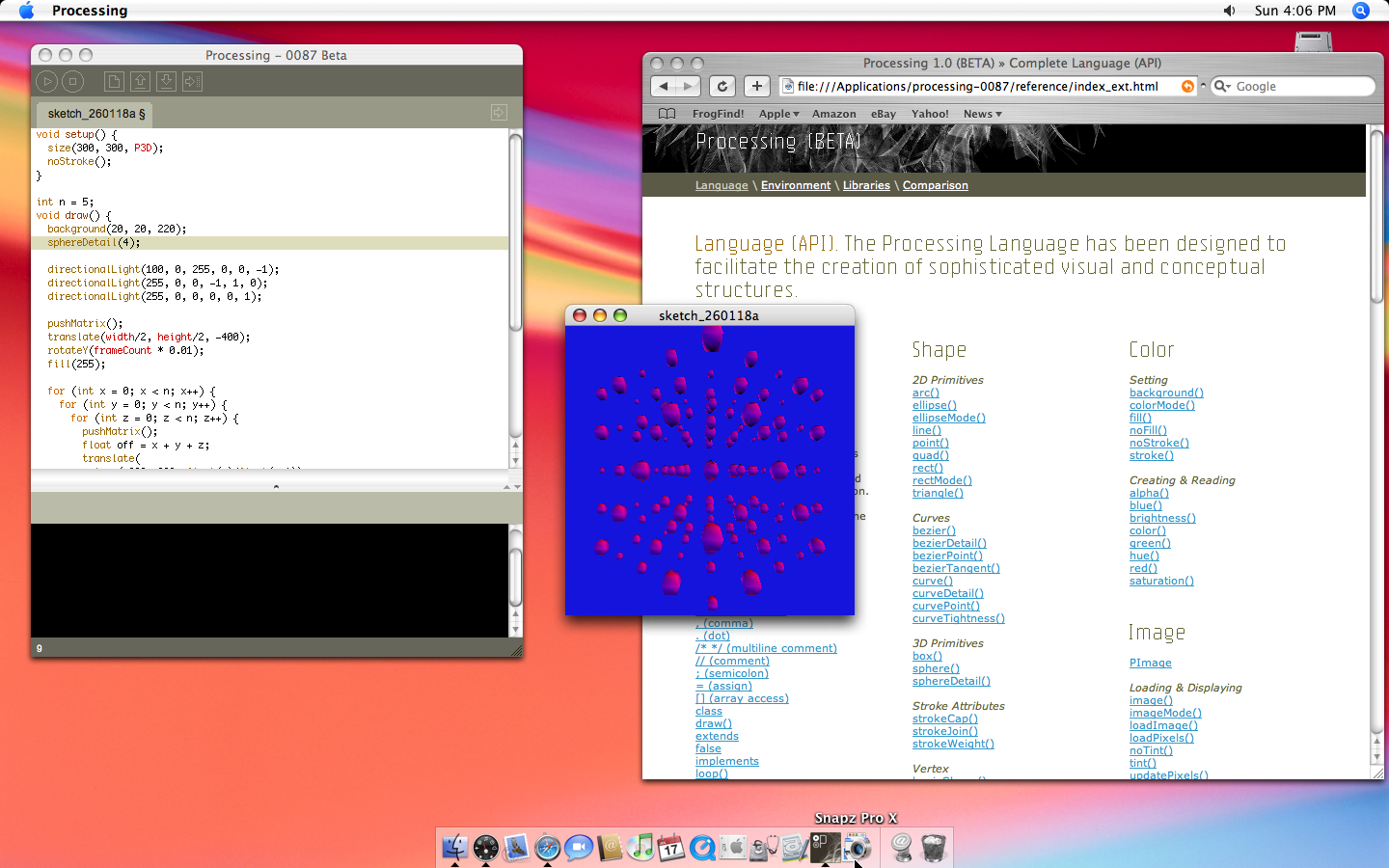
Processing Beta in Mac OS X 10.4
3D is now in its own designated mode, P3D, that current Processing users are likely familiar with. It uses OpenGL, so it has a lot more 3D capability. We can set lights now! Although there seemed to be a bug with the blue channel of ambientLight() not working, so although I really wanted a blue-and-magenta-only look via a blue ambient light, I had to recreate something similar enough using just directional lights.
The shading still looks fairly blocky. This is due to it using Gouraud shading, where lighting is calculated only per vertex for efficiency, and then those colors are blended across faces. Did you know you can also do this today in p5.js via setAttributes({ perPixelLighting: false })? It probably isn't necessary any more, and I'm guessing you didn't know this still existed. (Does that mean I can remove it and clean up the code? Please?) That said, this computer is still pretty graphically slow, so I've had to turn the number of sphere faces way down with the sphereDetail() function this version of Processing provides. But I can render more shapes than I could previously, and the lighting starts to give some depth!
The code looks fairly similar to before. Now, lerp exists for me to use (although map still does not exist.) frameCount is there too. Interestingly, push() and pop() from the alpha got renamed to pushMatrix() and popMatrix(), their current names to this day in Processing. In p5, these are just called push() and pop() still, maybe as a nod the nice and simple naming from the alpha.
void setup() {
  size(300, 300, P3D);
  noStroke();
}

int n = 5;
void draw() {
  background(20, 20, 220);
  sphereDetail(4);

  directionalLight(100, 0, 255, 0, 0, -1);
  directionalLight(255, 0, 0, -1, 1, 0);
  directionalLight(255, 0, 0, 0, 0, 1);

  pushMatrix();
  translate(width/2, height/2, -400);
  rotateY(frameCount * 0.01);
  fill(255);

  for (int x = 0; x < n; x++) {
    for (int y = 0; y < n; y++) {
      for (int z = 0; z < n; z++) {
        pushMatrix();
        float off = x + y + z;
        translate(
          lerp(-200, 200, float(x)/float(n-1)),
          lerp(-200, 200, float(y)/float(n-1)),
          lerp(-200, 200, float(z)/float(n-1))
        );
        sphere(15 * (1 + 0.5 * sin(frameCount * 0.1 + off * 2)));
        popMatrix();
      }
    }
  }

  popMatrix();
}
Processing 2, Mac OS X 10.15
Next, we jump forward in time to 2014. You can download old Processing major releases from the Processing website if you're interested in trying this at home. I'm now running my 2015 Macbook Pro. I tried running Processing 1 first, but that one wouldn't open for whatever reason.
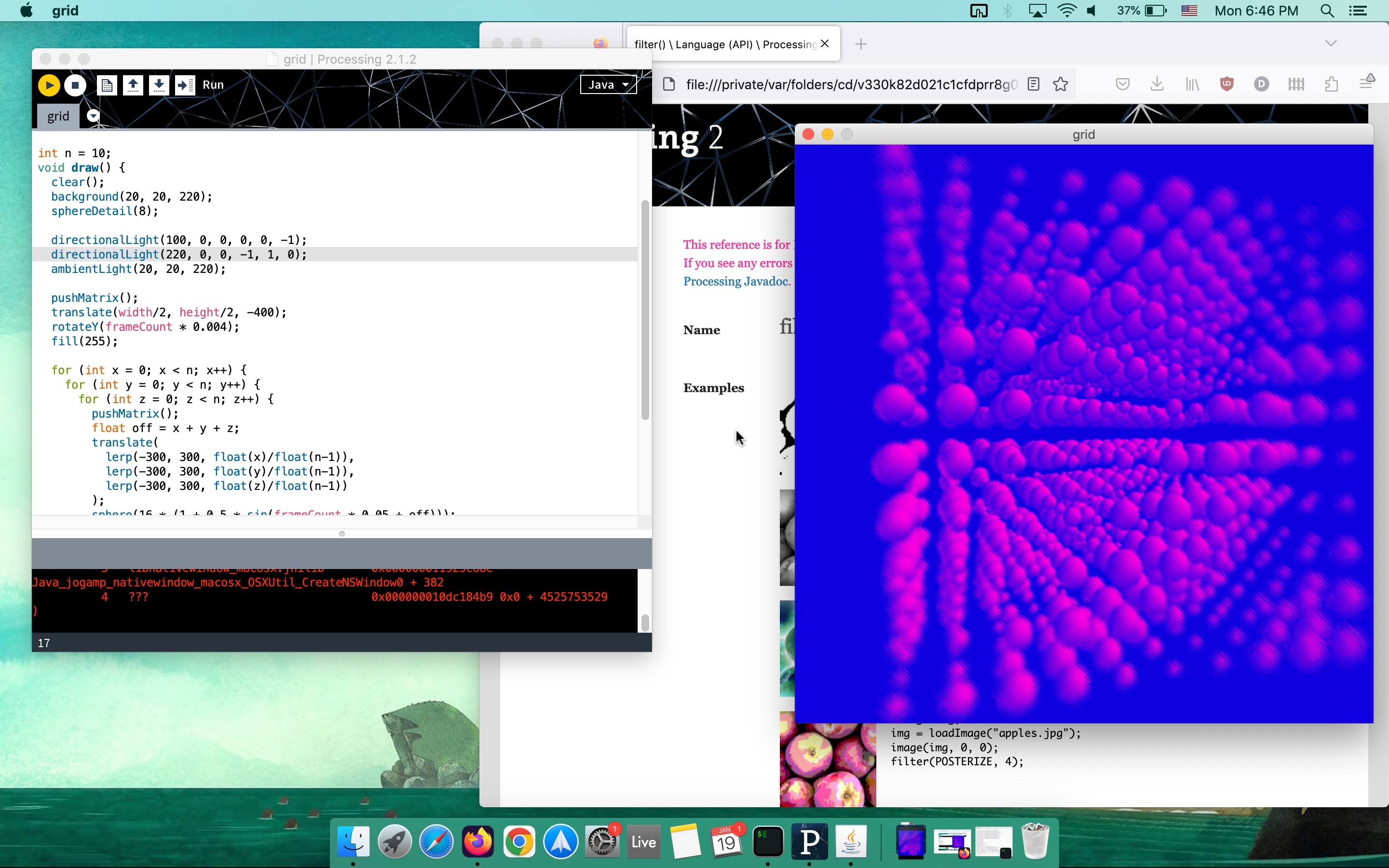
Processing Beta in Mac OS X 10.4
So by this point, I can add as many spheres to the scene as I need before it gets too visually busy, and the frame rate is fine! Also I can use all the lighting functions I want. And also I can make the canvas size bigger!
But the main new thing we get since last time, relevant for this sketch at least, is the ability to use filter shaders. Now there aren't great examples of this in the reference, but you can find examples in old forum posts, and Raph has collected some into this GitHub repo. Like in p5 now, you load the shader, and then call filter(yourShader).
PShader blur;

void setup() {
  size(600, 600, P3D);
  noStroke();
  blur = loadShader("blur.glsl");
  blur.set("sketchSize", float(width), float(height));
}

int n = 10;
void draw() {
  background(20, 20, 220);
  sphereDetail(8);

  directionalLight(100, 0, 0, 0, 0, -1);
  directionalLight(200, 0, 0, -1, 1, 0);
  ambientLight(20, 20, 220);

  pushMatrix();
  translate(width/2, height/2, -400);
  rotateY(frameCount * 0.002);
  fill(255);

  for (int x = 0; x < n; x++) {
    for (int y = 0; y < n; y++) {
      for (int z = 0; z < n; z++) {
        pushMatrix();
        float off = x + y + z;
        translate(
          lerp(-300, 300, float(x)/float(n-1)),
          lerp(-300, 300, float(y)/float(n-1)),
          lerp(-300, 300, float(z)/float(n-1))
        );
        sphere(16 * (1 + 0.5 * sin(frameCount * 0.05 + off)));
        popMatrix();
      }
    }
  }

  popMatrix();

  filter(blur);
}
So for this one I can finally do the thing from one of the inspiration sketches and do a faux barrel blur, where it gets blurrier farther from the center of the screen. I was initially going to do something similar to the original p5 implementation where a random offset is applied at each pixel, but I was running into some I think precision related issues where I wasn't getting a unique offset per pixel despite using the same random and noise functions used elsewhere. I hacked together something vaguely good enough but that has a bit of a diagonal pattern.
uniform sampler2D texture;
uniform vec2 sketchSize;

void main() {
  vec2 uv=vec2(gl_FragCoord.xy)/sketchSize.xy;
  vec2 toCenter = vec2(0.5, 0.5) - uv;
  float distToCenter = dot(toCenter, toCenter);

  float angle = (uv.x + uv.y) * 12345.67;
  vec4 col = texture2D(texture, clamp(uv + distToCenter*0.03*vec2(
    cos(angle),
    sin(angle)
  ), vec2(0.), vec2(1.)));

  gl_FragColor = col;
}
p5.js 2.2, MacOS 15.2
This one's a bit of a jump because p5 is not directly in the Processing lineage. More like a sibling, branching off in 2013 as a reimagination of what a Processing-like system made for the web would look like if started fresh at that point in time. We're also jumping a decade forward to today, using the latest p5 version.
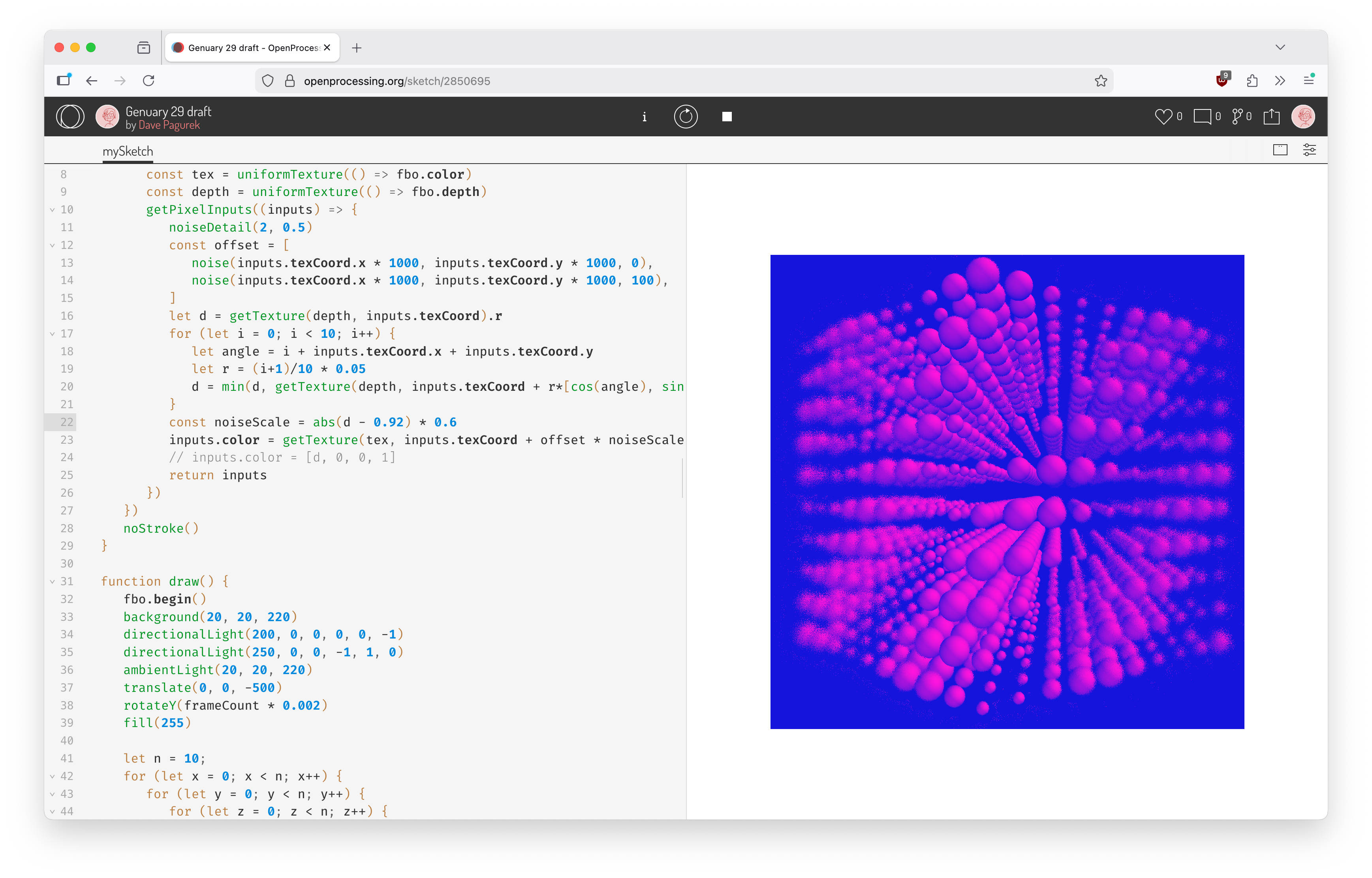
p5.js in OpenProcessing
It can do everything from that last Processing version. It additionally matches the 2x pixel density of my display, something that Processing also got in version 3, which I skipped over. But something else p5 gives access to that Processing does not is depth information. So rather than doing a barrel blur based only on distance on a 2D plane to the center of the canvas, we can do it based on the 3D depth.
As far as code goes, while I could have written a similar GLSL shader, we also have p5.strands now where this can be written in JavaScript.
let fbo
let blur

function setup() {
  createCanvas(600, 600, WEBGL)
  fbo = createFramebuffer()
  blur = baseMaterialShader().modify(() => {
    const tex = uniformTexture(() => fbo.color)
    const depth = uniformTexture(() => fbo.depth)
    getPixelInputs((inputs) => {
      noiseDetail(2, 0.5)
      const offset = [
        noise(inputs.texCoord.x * 1000, inputs.texCoord.y * 1000, 0),
        noise(inputs.texCoord.x * 1000, inputs.texCoord.y * 1000, 100),
      ]
      let d = getTexture(depth, inputs.texCoord).r
      for (let i = 0; i < 10; i++) {
        let angle = i + inputs.texCoord.x + inputs.texCoord.y
        let r = (i+1)/10 * 0.05
        d = min(d, getTexture(depth, inputs.texCoord + r*[cos(angle), sin(angle)]).r)
      }
      const noiseScale = abs(d - 0.92) * 0.6
      inputs.color = getTexture(tex, inputs.texCoord + offset * noiseScale)
      return inputs
    })
  })
  noStroke()
}

function draw() {
  fbo.begin()
  background(20, 20, 220)
  directionalLight(200, 0, 0, 0, 0, -1)
  directionalLight(250, 0, 0, -1, 1, 0)
  ambientLight(20, 20, 220)
  translate(0, 0, -500)
  rotateY(frameCount * 0.002)
  fill(255)

  let n = 10;
  for (let x = 0; x < n; x++) {
    for (let y = 0; y < n; y++) {
      for (let z = 0; z < n; z++) {
        push()
        let off = x + y + z;
        translate(
          map(x, 0, n-1, -1, 1) * 300,
          map(y, 0, n-1, -1, 1) * 300,
          map(z, 0, n-1, -1, 1) * 300,
        )
        sphere(16 * (1 + 0.5 * sin(frameCount * 0.05 + off)))
        pop()
      }
    }
  }
  fbo.end()

  push()
  shader(blur)
  plane(width, height)
  pop()
}
Reflections
Well, it definitely makes me appreciate how much power is present in our computers now. Even on a decade-old Macbook, Processing runs great. One has to spend a lot more time working around performance limitations when working on 2002 hardware. Maybe trying to do real-time animation was too much, and the real play would have been to export an image sequence that I could then stitch together into a smooth movie.
There is definitely something nice about how small the reference for Processing was in 2002. Constraints are fertile ground for creativity. I think some point along the way, it turned from a tool for doing creative things within a small, approachable set of options to a tool that tries to be a swiss army knife of graphics, with everything you might want to use within reach. Both are valuable, coming from different headspaces.
But mostly, it's cool how little changed. Working within an IDE with the reference open in a tab, with a familiar code structure, it's pretty easy to get back into the 2002 groove and work back to 2026!